


.png)


 Call Us
"What!? They're closed!!??" How frustrating is it to arrive at your destination - a restaurant, shop, gym, etc. only to find... they are not open for business. On top of which, you've done your due diligence and Googled their business hours and it says they should be open. A word of caution, the business hours listed in Google are not always correct. It takes a savvy and proactive business owner (or marketer) to ensure that business hours are correct. Someone who is especially on top of things will also add special hours for holidays and events.
Set Your Special Business Hours in Google in 3 Easy Steps:
Step 1 - Log into your Google My Business Account and click to edit the "Info" section.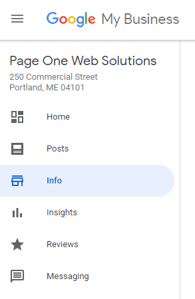
Step 2 - Under your normal hours section there is a "Special Hours" section. Click to edit your special hours.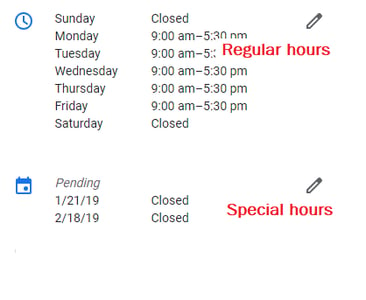
Step 3 - Click "Add New Date" then choose the date, you can select Open/Closed or arrange your business hours. Click apply.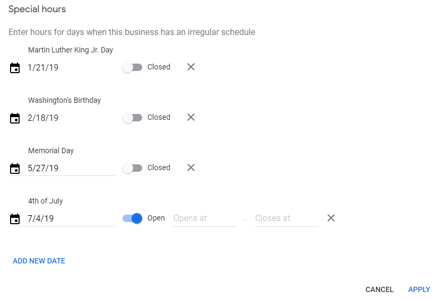
...and voilà! Special hours added and you don't end up disappointing anyone with incorrect information. Depending on the type of business you have you may also want to duplicate this inforamtion in Yelp and Bing Places.
Making sure your local presence is accurate and well maintained is essential for your customers and other people looking for your business. It's also very imporant to how well your business is optimized for organic search. Fill out this quick form to see how your business is optimized in Local Search.
Page One Web Solutions LLC
Get Found Online!
Insights that drive informed decisions
Get practical frameworks, proven playbooks, and growth stories from teams building smarter systems.

The Content King Is Dead, Long Live Context
I spent three days at UNBOUND 26 about a month ago, and if I had a dollar for every time someone said "context," I...
.png?width=450&name=brand-announcement-lp%20(1).png)
Introducing GrowthTech Partners
Twenty years ago, I left a job at an industrial directory company with a simple observation: Google was about to change...

The New Era of Search: What GEO & AEO Mean for Modern...
We are in the midst of a shift from classic, keyword-driven SEO to generative engine optimization (GEO) and answer...