


.png)


 Call Us
 Working in Paid Search, I felt a little out of place at Distilled’s recent Searchlove conference in Boston. While Searchlove was seemingly SEO oriented, I still learned a few tips and tricks to help my clients with their paid advertising. My favorite presentation had to be Paul Shapiro’s talk about automating keyword research. While I am not a developer and would need a month of Sundays to understand even the most basic coding concepts, Paul explained some very basic concepts that I have since replicated (to some degree of success).
You’ll need a copy of the free, open source application called Knime. The installer bundle includes a bunch of data manipulators that gives the user an incredibly robust array of features. Knime may look daunting, but that’s because it is. Not to worry, though, even I have made this automation app work. Paul walked us through a sample workflow that used Google Suggest to find new keyword opportunities. This is a great workflow for users that might not be API masters; the interface is a simple combination of a URL and your intended search query.
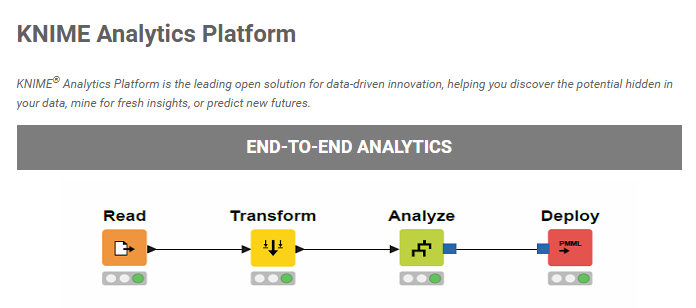 This workflow, which you can download here and import into your Knime, basically takes a seed list of keywords and runs them each through Google Search, saving each suggestion to an Excel spreadsheet. For this workflow, you only need to click on the XLS Writer and set your Excel sheet destination. This process has been very helpful in determining user intent, which was a central topic of the Searchlove conference. With this workflow, I can enter a few keywords and get new keywords that better speak to what my intended user is really looking for. At the end of the day, intent is what drives a click to my clients’ sites.
Insights that drive informed decisions
Get practical frameworks, proven playbooks, and growth stories from teams building smarter systems.

The Content King Is Dead, Long Live Context
I spent three days at UNBOUND 26 about a month ago, and if I had a dollar for every time someone said "context," I...
.png?width=450&name=brand-announcement-lp%20(1).png)
Introducing GrowthTech Partners
Twenty years ago, I left a job at an industrial directory company with a simple observation: Google was about to change...

The New Era of Search: What GEO & AEO Mean for Modern...
We are in the midst of a shift from classic, keyword-driven SEO to generative engine optimization (GEO) and answer...